

The home office has quietly become one of the most invested-in rooms in the family home, competing with the kitchen for renovation attention and daily importance. Yet the difference between a work-from-home setup that drains energy across eight hours and one that actively supports focus, comfort, and performance rarely comes down to a full overhaul.
It almost always comes down to six deliberate decisions across six dimensions of the home office experience: ergonomics, lighting, organization, audio, technology, and personal expression. These are the six home office upgrades working from home professionals notice.
1. Get Your Body in the Right Position
Bad ergonomic positioning compounds physical strain across the upper body with every passing hour, and research places musculoskeletal symptom prevalence at 83 percent among computer users. Three specific adjustments directly target these prominent friction points before they escalate.
First, set your monitor so the top edge sits at or just below eye level to prevent the downward neck flexion that causes tension headaches. Position the screen approximately 50 to 70 centimeters from your face to reduce eye convergence strain across long sessions, as over 40 percent of workers report moderate to severe discomfort in their eyes, neck, or head.
Adjust your seat so lumbar support maintains a neutral spine with hips and knees at roughly ninety degrees. Since approximately nine percent of adults report recent repetitive strain injuries, avoiding reclining or hunching forward remains crucial for long-term health.
| Pro Tip: Set your monitor’s top edge at eye level, position it 50 70 cm away, and adjust your chair so hips and knees are at 90 degrees. This simple alignment can prevent tension headaches and back strain all day. |
2. Replace the Laptop That’s Holding You Back
For anyone spending eight or more hours daily at a computer, the machine itself sets the ceiling for daily work performance. A professionally refurbished business-grade laptop frequently delivers better build quality, keyboard feel, and processing power than a new consumer machine at the equivalent price point.
Business models are engineered to demanding durability standards, meaning their hinges and casing easily outlast thin consumer plastics.
The keyboard difference alone justifies the switch for remote workers who type heavily throughout the day. Business keyboards are designed for sustained use, offering tactile resistance that membrane models cannot match.
Refurbished business machines often carry processor and memory configurations that new retail laptops lack, since the original specifications were built strictly for enterprise demands.
Choosing a certified refurbished laptop from PCLiquidations puts tested, enterprise-class hardware within realistic reach. Savings typically run 30 to 60 percent versus new retail pricing, landing you materially superior electronics for the same budget. Opting for a refurbished laptop home office setup extends the electronics lifecycle and reduces waste by keeping capable hardware in circulation.
| Key Insight: A refurbished business-grade laptop can deliver MIL‑SPEC durability and enterprise‑class performance at 30 to 60% less than new retail. The keyboard alone is a noticeable upgrade for all‑day typing. |
3. Cover Your Desk in Something That Means Something
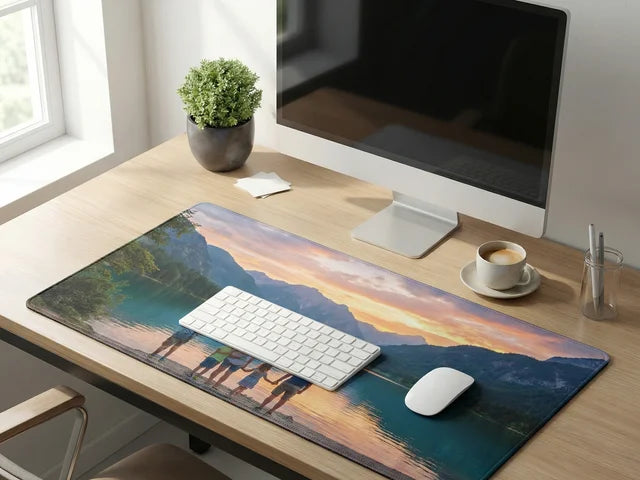
Image from Custom Envy
A full-surface custom desk mat workspace upgrade does specific things that no generic desk accessory matched before. Broad coverage unifies the visual surface, protects the desk material from heat marks, and eliminates the fragmented look of isolated peripherals scattered everywhere. A fabric mat surface measurably improves mouse tracking precision and consistency compared with bare wood or laminate.
Extended typing on a fabric surface naturally reduces wrist and forearm pressure across long hours of coding or writing. Uploading a custom image or personal design pattern transforms an otherwise basic physical setup into a premium printed focal point.
Building your setup with a custom neoprene desk mat from Custom Envy combines enhanced tracking, wrist support, and vivid photo reproduction on a single fabric piece. Because each order plants one tree while securing a lifetime warranty, upgrading your tracking surface also supports environmental restoration.
4. Replace Overhead Light With a Desk Lamp
Ceiling light casts harsh shadows across the desk surface, produces inconsistent illumination, and creates an unflattering wash on video calls. A quality desk lamp with adjustable colour temperature solves all three visual problems simultaneously.
In the warm range around 2700K, directional lighting produces lower stimulation that supports sustained reading and evening tasks without taxing your vision. At the daylight end of the dial between 5000K and 6500K, it sharpens visual contrast for reviewing documents while keeping alertness elevated.
Directional desk fixtures produce a noticeably cleaner image than overhead lighting setups during virtual meetings. Most remote workers underinvest in this specific visual signal, despite the modest cost of quality desktop illumination.
5. Clear the Cables
Trailing cables tangle, cause accidental disconnects, and accumulate dust around hardware connectors. Visual noise also carries a documented micro-attention cost that subtly fractures concentration. A clear desk surface functions as a visual cue that signals the start of focused work, and that mental cue breaks when the surface disappears under loose leads.
Three low-cost fixes handle most residential setups. Adhesive cable clips route wires neatly along desk edges, a management tray mounts under the desk surface, and a single power strip positions plugs entirely out of sight.
| Pro Tip: Use adhesive cable clips, an under-desk management tray, and a single power strip out of sight. This low-cost fix clears visual clutter, reduces dust, and instantly signals that your workspace is ready for focus. |
6. Invest in Audio That Earns Its Place
Every call, focus session, and video meeting relies entirely on your audio connection. A reliable headset with active noise cancellation transforms a loud household environment into a controlled broadcast space. Erasing family activity, delivery alerts, and background appliances benefits the people on the other end of the line just as much as it helps you.
The same hardware that handles client conversations also serves focused listening for ambient sound or auditory cues that signal deep work mode. Clear outward communication directly changes how colleagues perceive your clarity during remote meetings.
Your Upgrade Roadmap
Physical discomfort points to prioritizing monitor and seating ergonomics first, while frequent squinting calls for immediate adjustments to desk lighting. Visual distractions fall away by routing trailing power cables out of sight, just as noisy household backgrounds necessitate dedicated noise-canceling headsets.
When the daily bottleneck stems from software freezing or processing delays, sourcing enterprise-grade hardware provides immediate workflow relief. Finally, a functionally sound but sterile environment benefits directly from adding a properly sized, customized fabric mat to anchor the peripherals.